OFIO
  • Product
    • Enterprise
    • Dealers
  • Integrations
  • Why OFIO
  • Sign in
Book a demo

Access control command center

Every panel. One command.

OFIO puts people, codes, arming, alarms and service for every site on one console, over the panels you already have. It never claims success a panel has not confirmed.

Book a demoTry the sandbox
Take the 2-minute tour
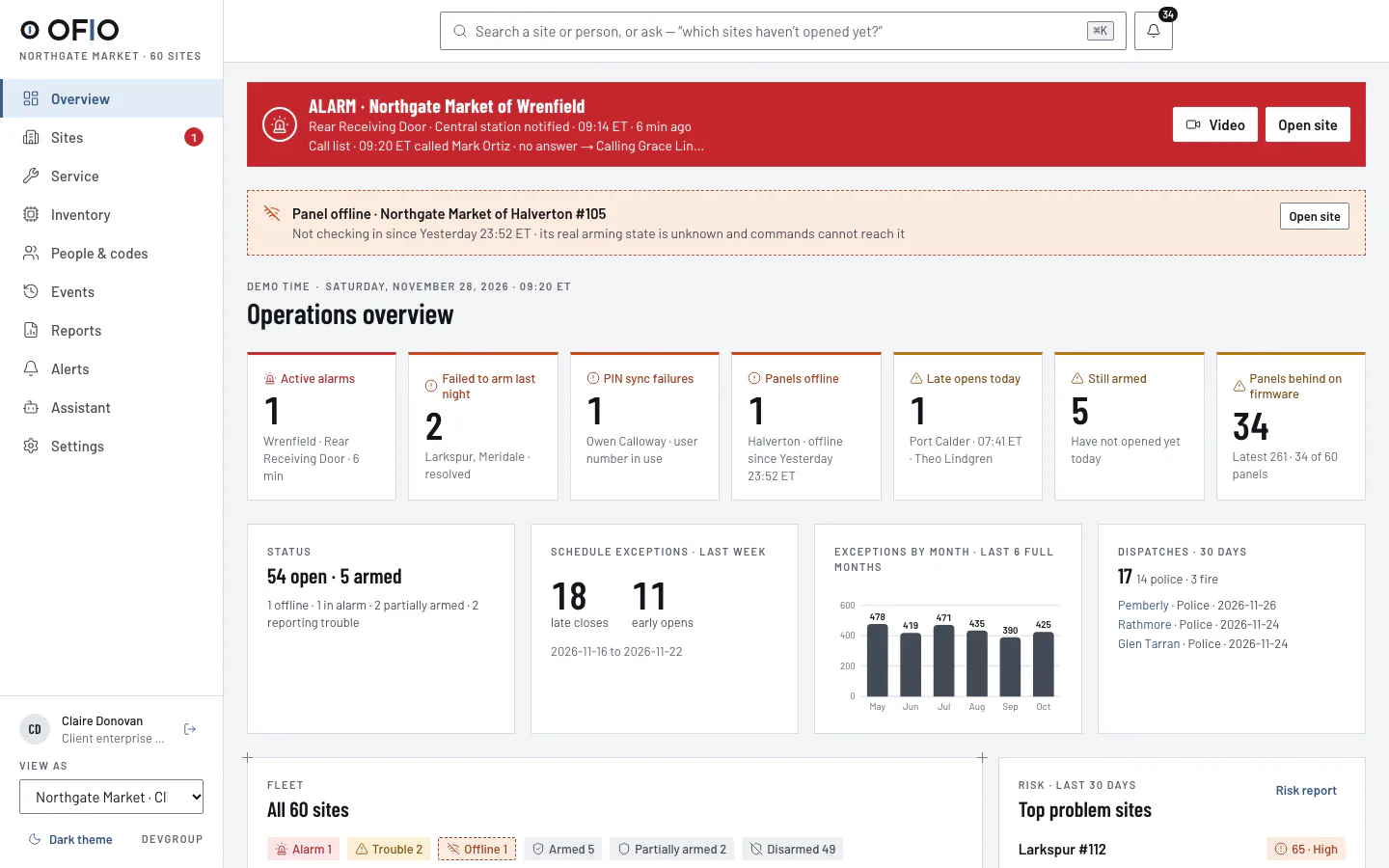
Operations overview: the alarm and offline banners and KPI tiles, then a scroll down to the 60-store fleet grid and the risk list, and back.

Works with

  • DMP
  • Bosch*
  • Rhombus*
  • OpenEye

* Bosch and Rhombus connectors are coming soon. DMP panels and the OpenEye video jump work today.

The problem

Many sites, many panels, no proof.

Codes are pushed one panel at a time, arming is a phone call, and the first sign of a faulty door is the alarm it causes.

  • 94–98%1

    of alarm calls are false

    A long-cited US Department of Justice figure.

  • 60.8%2

    convenience-store staff turnover

    First half of 2025. Every leaver is a code to remove from every panel.

  • $250–5003

    for one truck roll

    Commonly cited cost of sending a technician to site.

  1. 1US Department of Justice COPS Office, via the ASU Center for Problem-Oriented Policing, False burglar alarms, problem-oriented guide for police
  2. 2NACS, 3 key metrics for c-store employee retention
  3. 3XOi, Truck roll optimization in field service

What OFIO does

The daily work of every site, in one place.

People & codes

One directory for every door and every code.

Add or remove a person once. OFIO pushes the code to every panel they need, one at a time, and shows which panels confirmed.

  • PIN sync state per panel, with Retry when a panel rejects a code
  • Shared codes found, with their usage, and split in one step
  • Temporary access that expires on its own
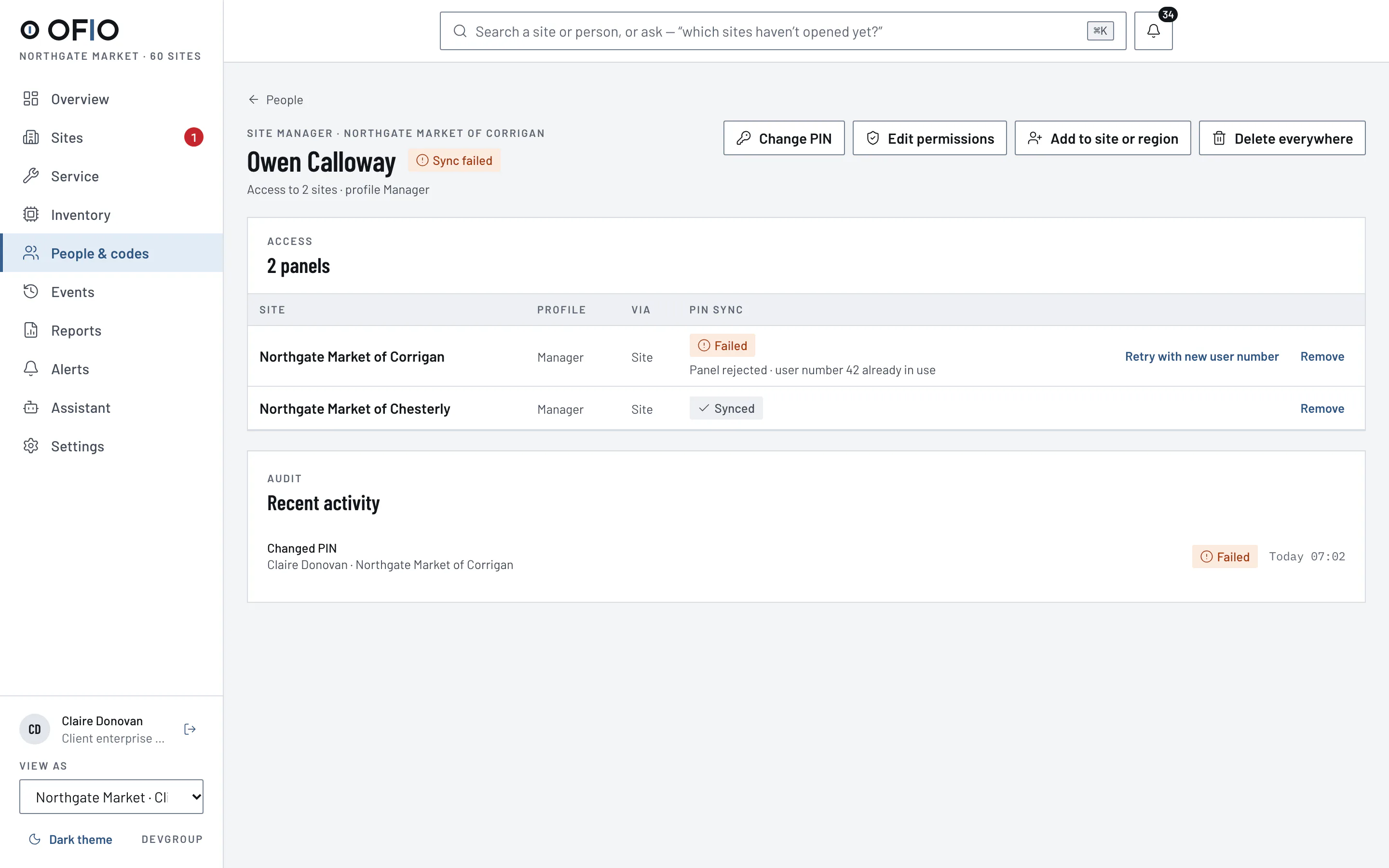
One person’s access table: one panel rejected the new code because the user number is in use, with Retry with new user number beside it; the other panel is Synced.

Arming

Armed means armed.

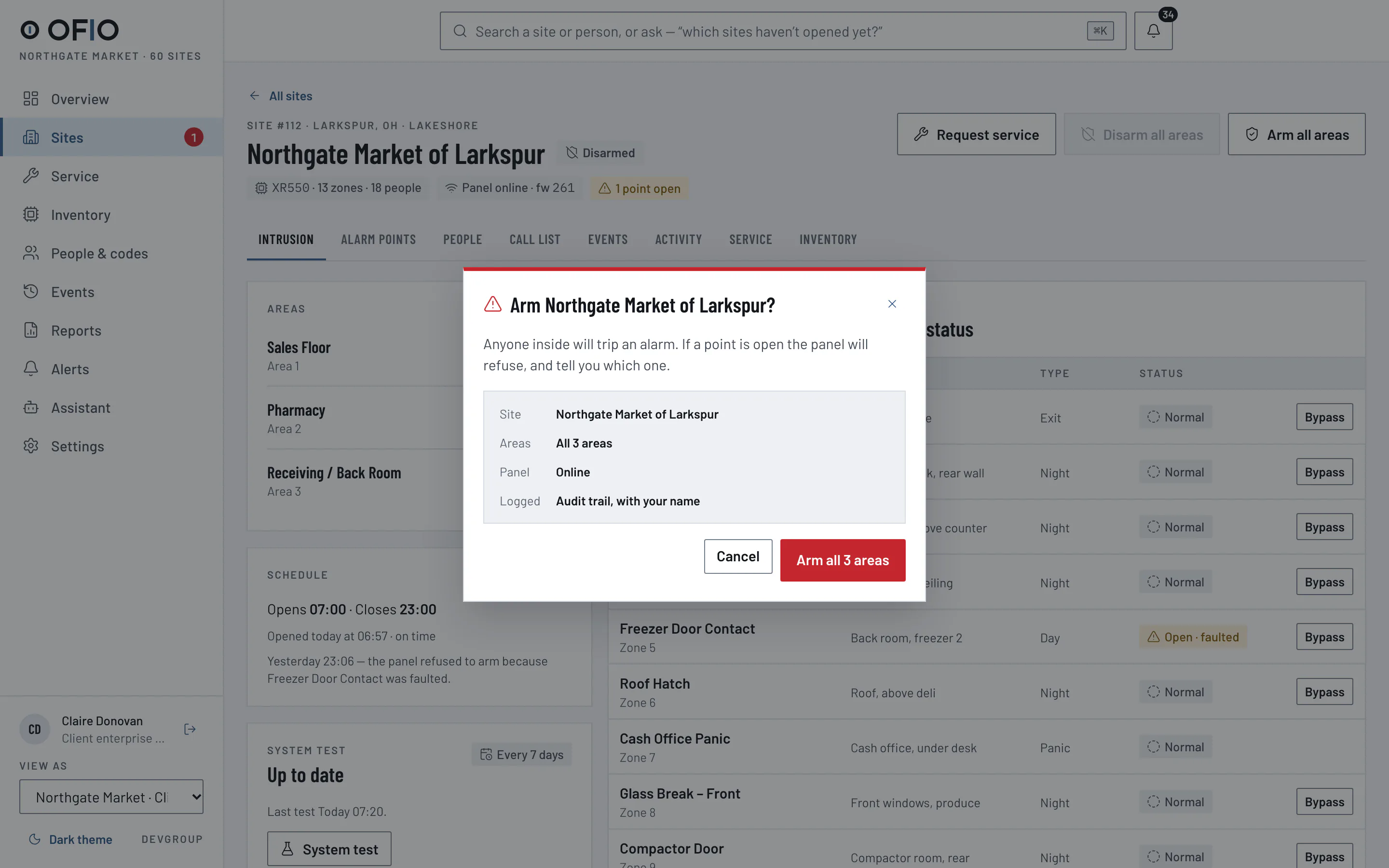
Every arm and disarm is confirmed before it is sent and shown as pending until the panel answers. A refused arm names the open point.

  • Bypass a faulted point and arm everything else
  • Auto-arm a group of sites after close
  • Fail-to-arm and late opens on the morning report
The arm confirmation dialog: it names the store, all three areas, the panel’s state and that the action is logged, before anything is sent.

Sites & map

The whole estate on one screen.

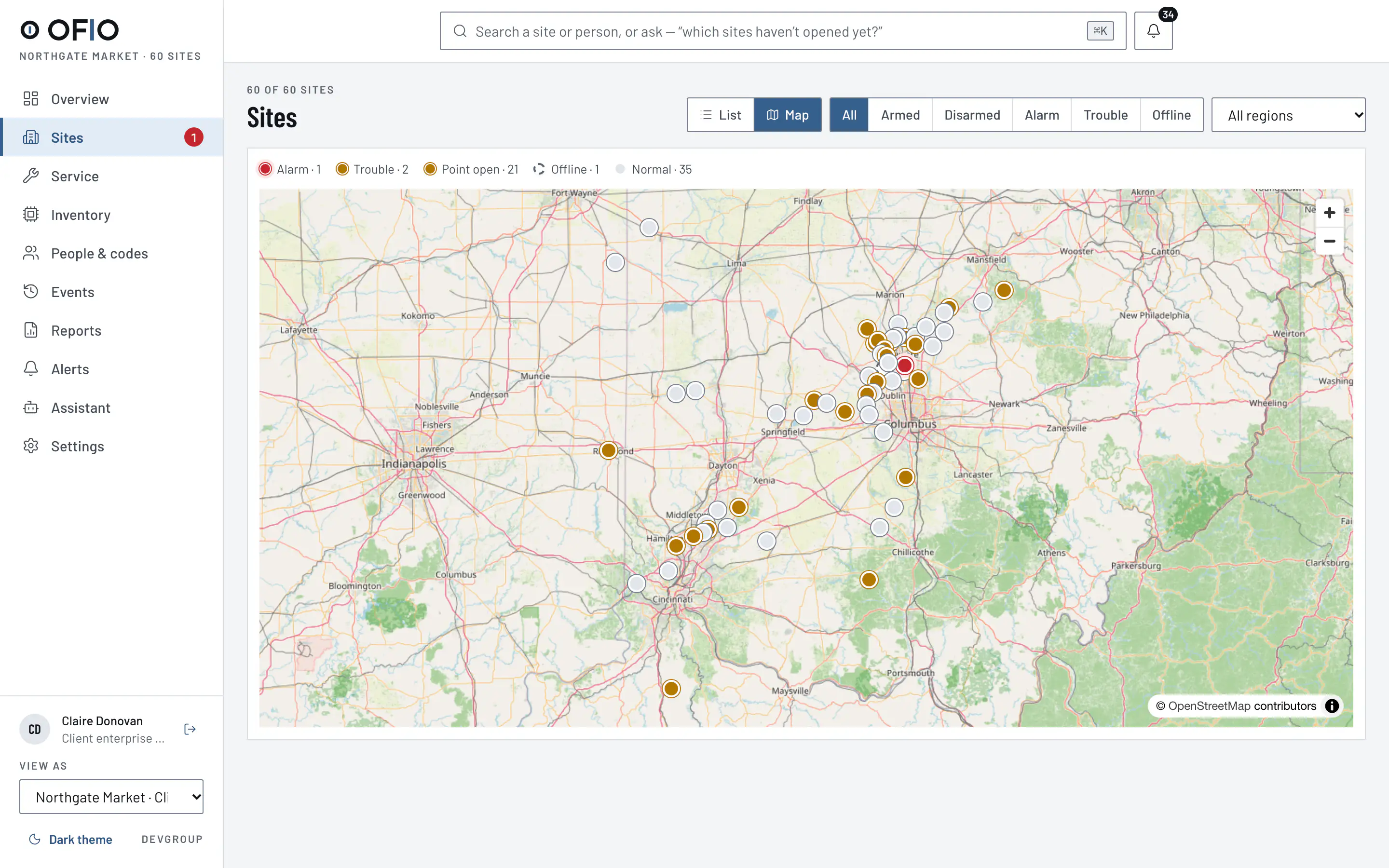
The fleet grid and the map show every site at once. Calm is grey; only exceptions take colour, so the store that needs you stands out.

  • Filter by region, group or state
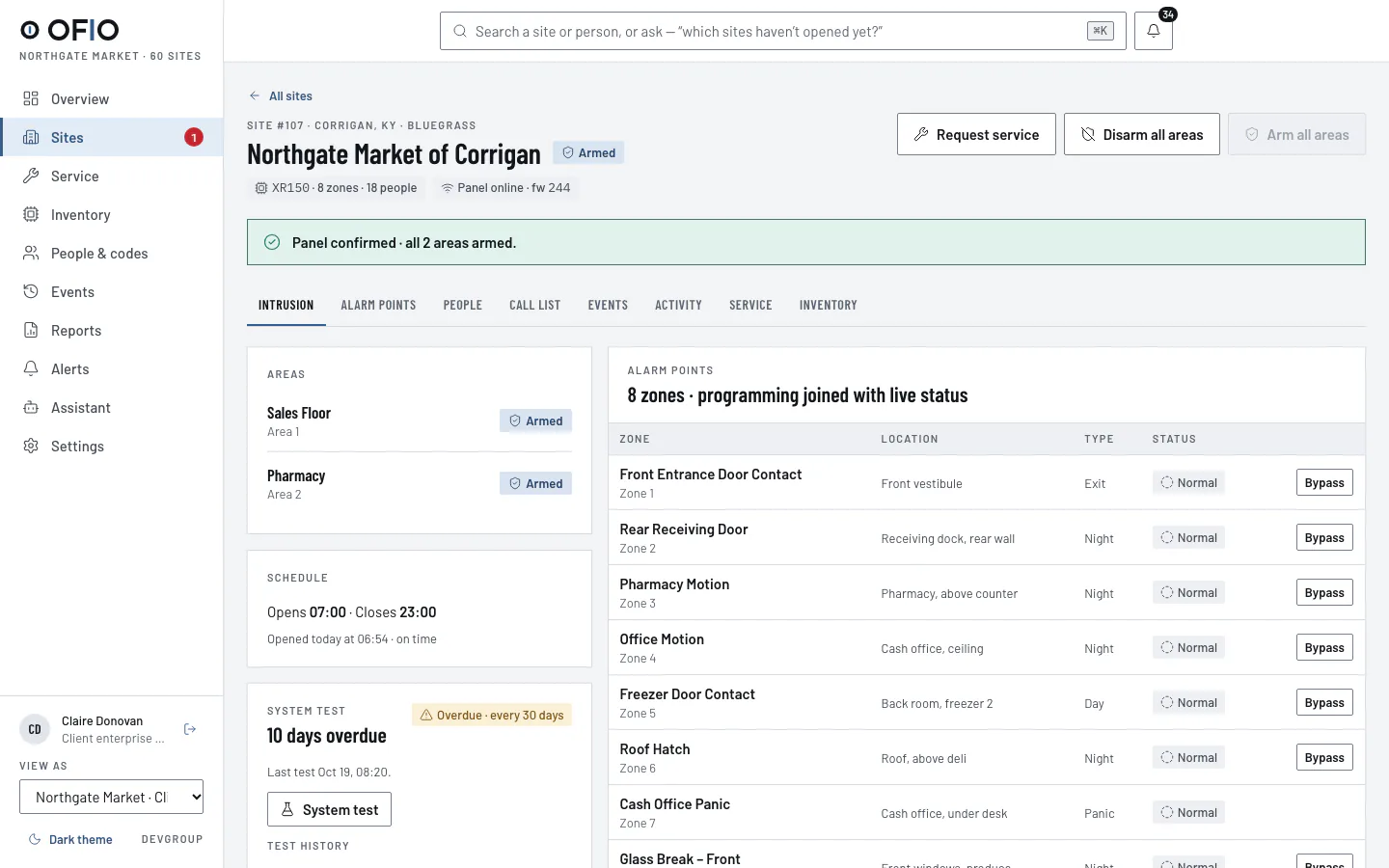
  • Each site: intrusion, alarm points on the floor plan, people, call list and events
  • Offline panels flagged at once, with their last cached programming
Map of all 60 stores, each pin coloured by state, with a legend counting alarm, trouble, point open, offline and normal sites.

Alerts & reports

See the exception, not the noise.

Alerts reach the right people by email or text. Reports show exceptions only, and a scheduled report says so when the night was clean.

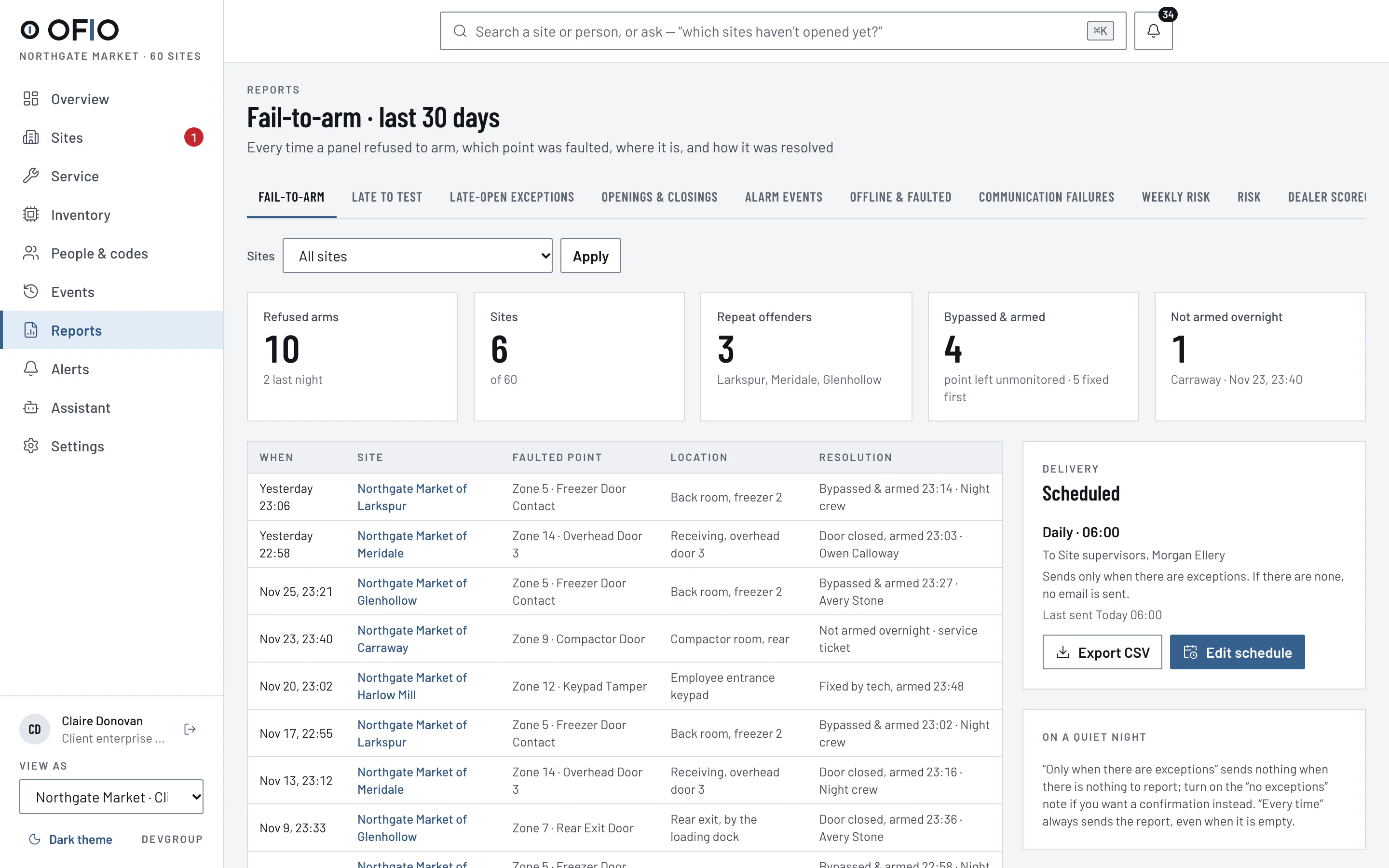
  • Fail-to-arm, late opens, alarms, offline panels and communication failures
  • Schedule any report by email, exceptions only by default
  • Export any report to CSV
The fail-to-arm report: refused arms, repeat offenders and bypasses over 30 days, each row with the faulted point and how it was resolved, beside the daily delivery schedule.

Service & risk

Fix it before it rolls a truck.

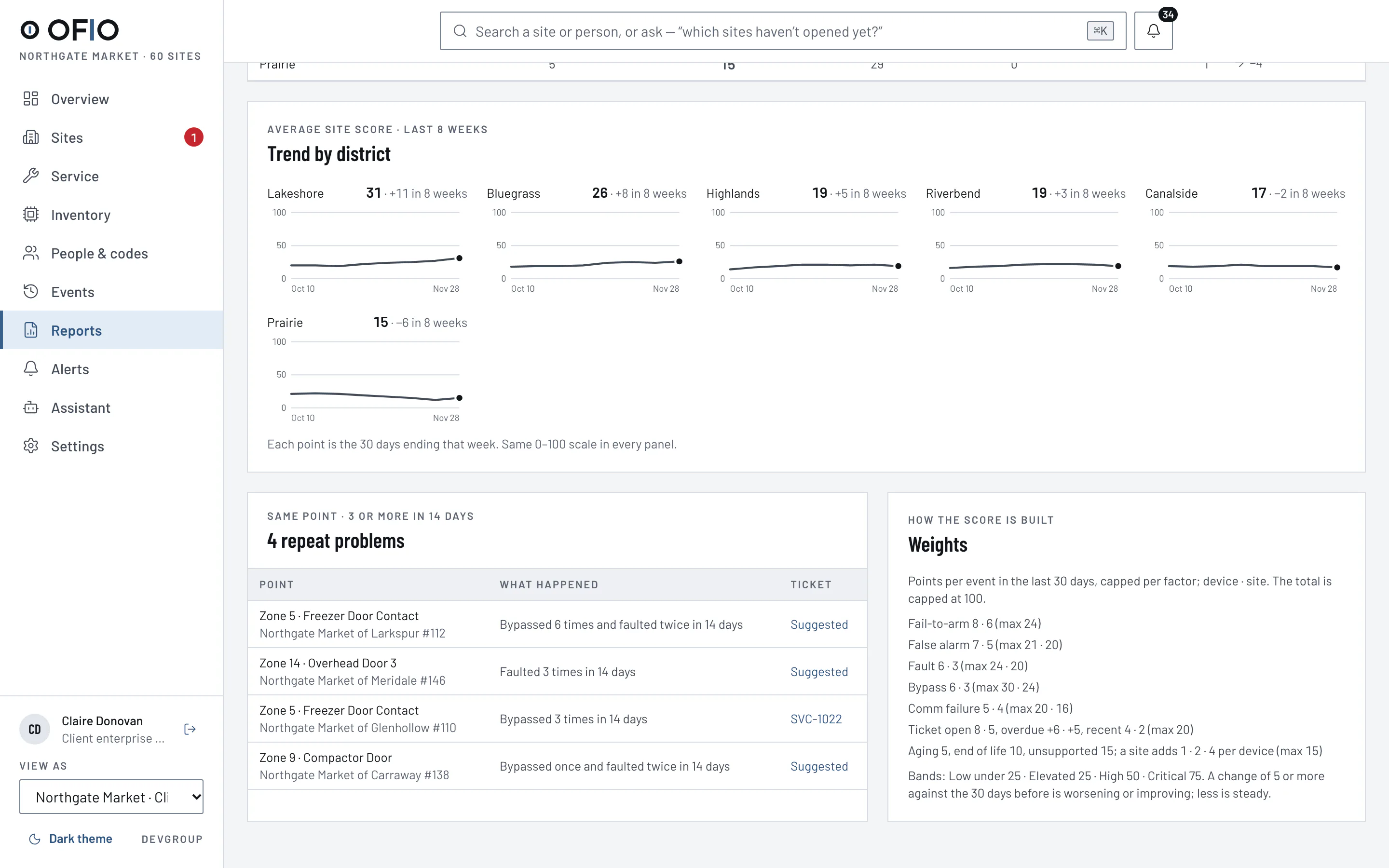
OFIO scores every site and device on its recent trouble and finds repeat problems on its own. Request service from the site; the ticket keeps one timeline.

  • Repeat problems turned into suggested tickets
  • The dealer updates a ticket by secure link or email reply, with no login
  • Inventory with firmware compliance and each device’s ticket history
The foot of the risk report: average site score by district over 8 weeks, four repeat problems found on one point in 14 days with a suggested ticket, and how the 0–100 score is built.

Assistant

An assistant that asks before it acts.

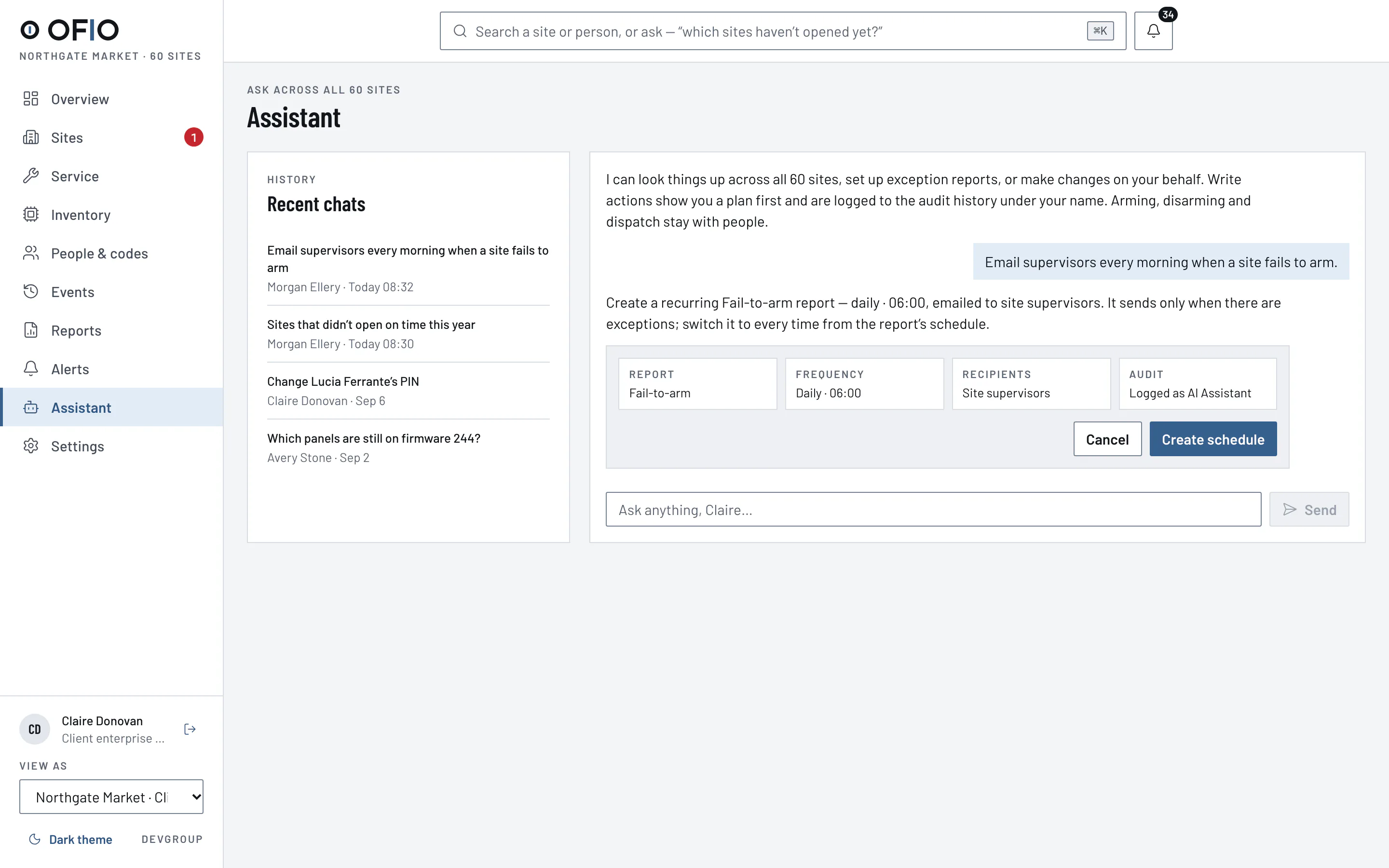
Ask in plain language for a report, a lookup or a change. OFIO answers with a plan, and nothing runs until a person confirms it.

  • Arming, disarming and dispatch always stay with people
  • Totals come from the console’s own counts, never estimated
  • Every confirmed change is written to the audit log under your name
The assistant turning “Email supervisors every morning when a site fails to arm” into a plan: report, frequency, recipients and audit, with Cancel and Create schedule.

Arming

Every store armed after close.

Turn on auto-arm for a region or a store: every site still disarmed after close is armed, and each result is recorded. A store that refuses names the open point and lands on the morning fail-to-arm report.

Auto-arm · Lakeshore · 30 min after close

14

  • 13ArmedStill disarmed after close, armed by auto-arm
  • 1Refused#112 · Zone 5 · Freezer door contact open
Arming a store: the confirm dialog, then Arm sent while OFIO waits for the panel, then Panel confirmed · all 2 areas armed.

Two buyers, one product

Built for the people who run the sites, and the dealers who service them.

  • Multi-site operators

    Store operations, loss prevention and facilities teams running 20 to 500 sites on panels from more than one vendor.

    OFIO for enterprise
  • Security dealers and integrators

    Customer accounts, service requests, dispatch, inventory and pricing in one portal, and fewer truck rolls.

    OFIO for dealers

How it works

Three steps to one console.

  1. 01

    Connect your panels

    OFIO connects to each vendor’s gateway. Panels stay where they are, on the wiring and the monitoring you have.

  2. 02

    Map sites and people

    Sites sit in regions and groups, alarm points go on floor plans, and every person and code moves into one directory.

  3. 03

    Operate from one console

    Arm, change codes, work alarms and pull reports for every site, in one vocabulary whatever the vendor.

Get started

Every panel. One command. Your sites.

Book a walk-through on the problems your sites have today, or ask for a sandbox and work the Northgate Market fleet yourself.

Book a demoTry the sandbox
Take the 2-minute tour
OFIO

Access control command center

Product

  • Product
  • Product tour
  • Integrations
  • Why OFIO

Solutions

  • Enterprise
  • Dealers

Get started

  • Book a demo
  • Try the sandbox

Company

  • Company
  • Privacy
  • Terms

Created by DevGroup · EDGE Affiliates