OFIO
  • Product
    • Enterprise
    • Dealers
  • Integrations
  • Why OFIO
  • Sign in
Book a demo

Product

One console for every site, every panel, every person.

Sites, people and codes, arming, alarms, reports, service and an assistant, in one vocabulary whatever the vendor. Here is each part, as it looks in OFIO.

Book a demoTry the sandbox
Take the 2-minute tour
Operations overview: the live alarm and offline-panel banners above KPI tiles for active alarms, failed arms, PIN sync failures, offline panels, late opens and stores still armed.
  • Operations overview
  • Sites & map
  • Site detail
  • People & codes
  • Arming
  • Alerts
  • Events & video
  • Reports
  • Service & risk
  • Assistant

Operate

Sites, people, arming and alarms.

Operations overview

The morning read on every site.

KPI tiles ordered by severity, then the fleet grid: one cell per site, sorted by number so people learn the positions.

  • Active alarms, failed arms, PIN sync failures, offline panels and late opens
  • Each tile opens the list it counts
  • An alarm banner on top until the panel reports it restored
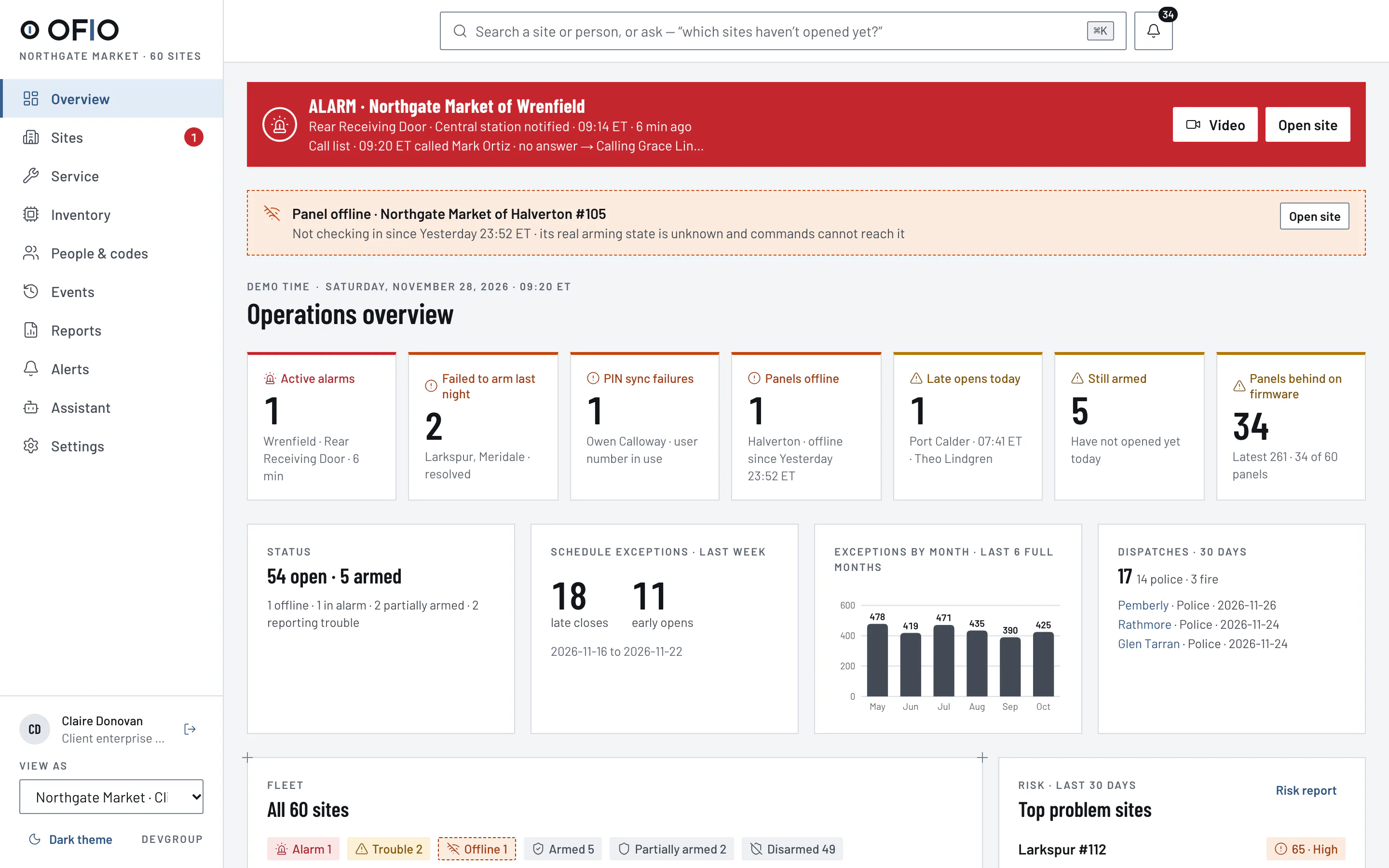
Operations overview: the live alarm and offline-panel banners above KPI tiles for active alarms, failed arms, PIN sync failures, offline panels, late opens and stores still armed.

Sites & map

Find the outlier without reading a word.

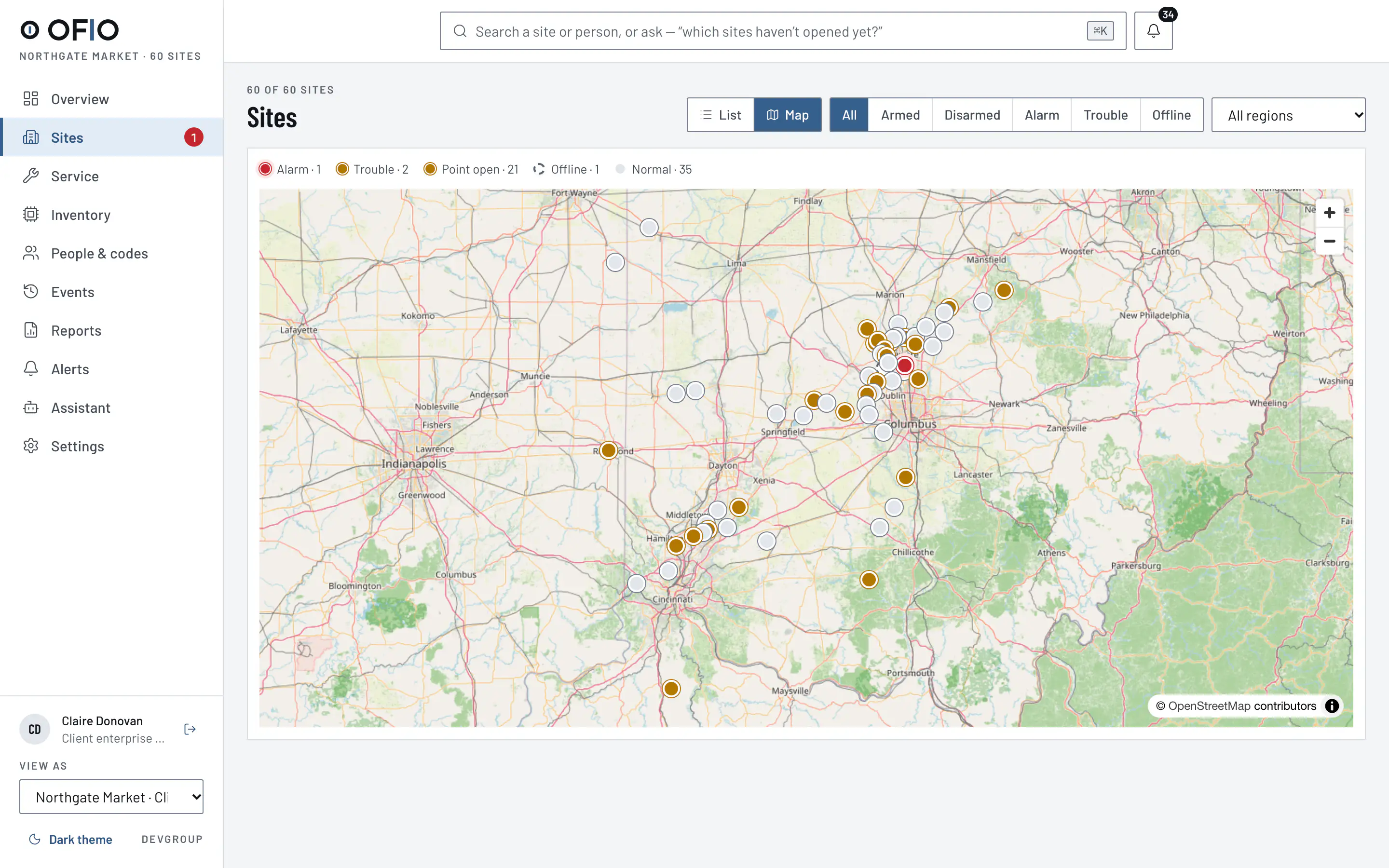
The same estate as a list or a map, filtered by region, group or state. Each pin and cell carries an icon, so it reads in greyscale too.

  • Regions and site groups
  • Holiday hours and auto-arm per group
  • Map legend with live counts
Map of all 60 stores, each pin coloured by state, with a legend counting alarm, trouble, point open, offline and normal sites.

Site detail

Everything about one site, one tab at a time.

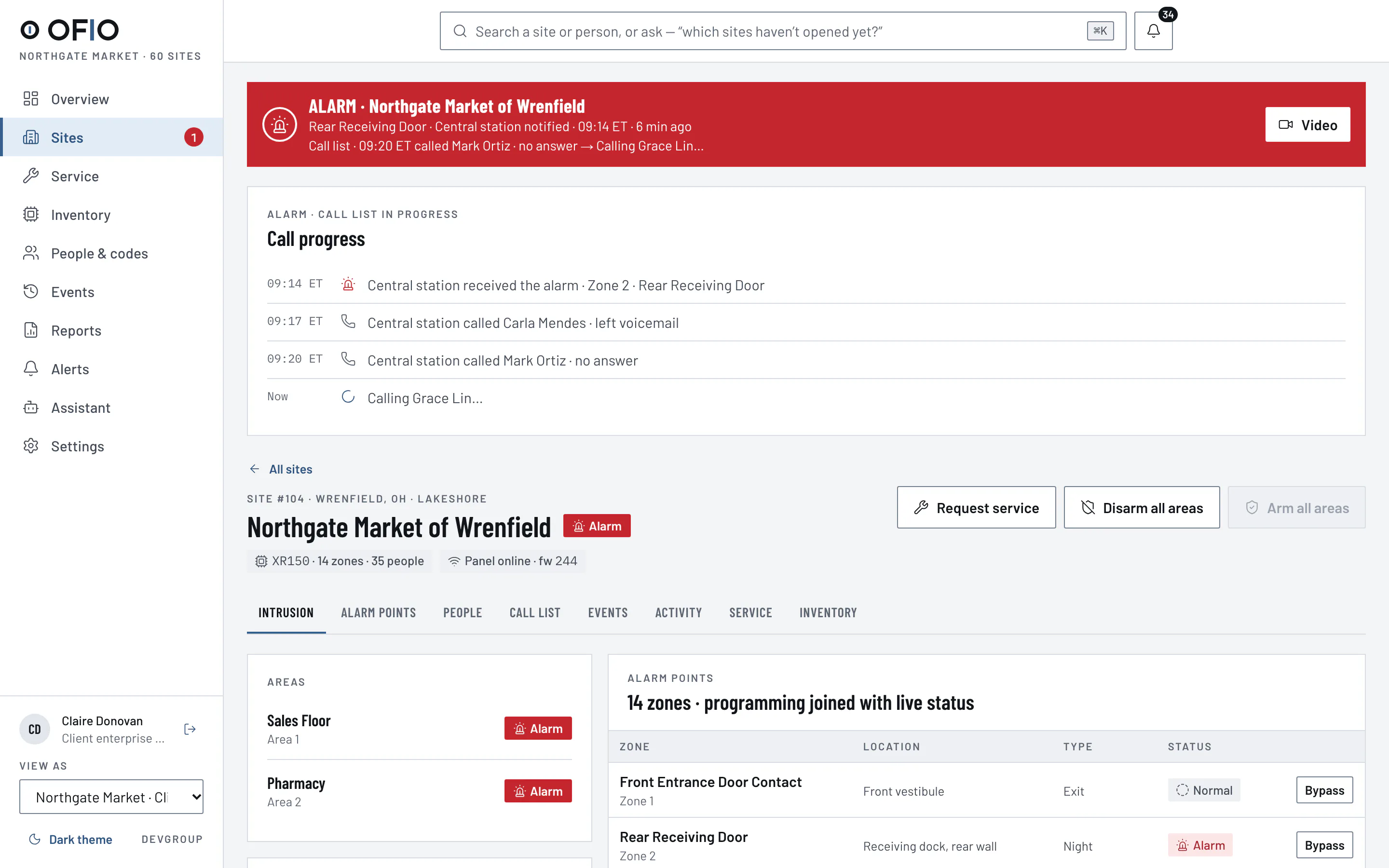
Intrusion, alarm points, people, call list, events, activity, service and inventory for the site you opened.

  • Areas and their arming state, with the points that are open or bypassed
  • Alarm points dragged onto the site’s floor plan
  • The call list as the central station works it
A store in alarm: the red alarm banner with a Video button, the central station’s call progress, and the store’s areas and alarm points below.

People & codes

Change a PIN once. Watch every panel take it.

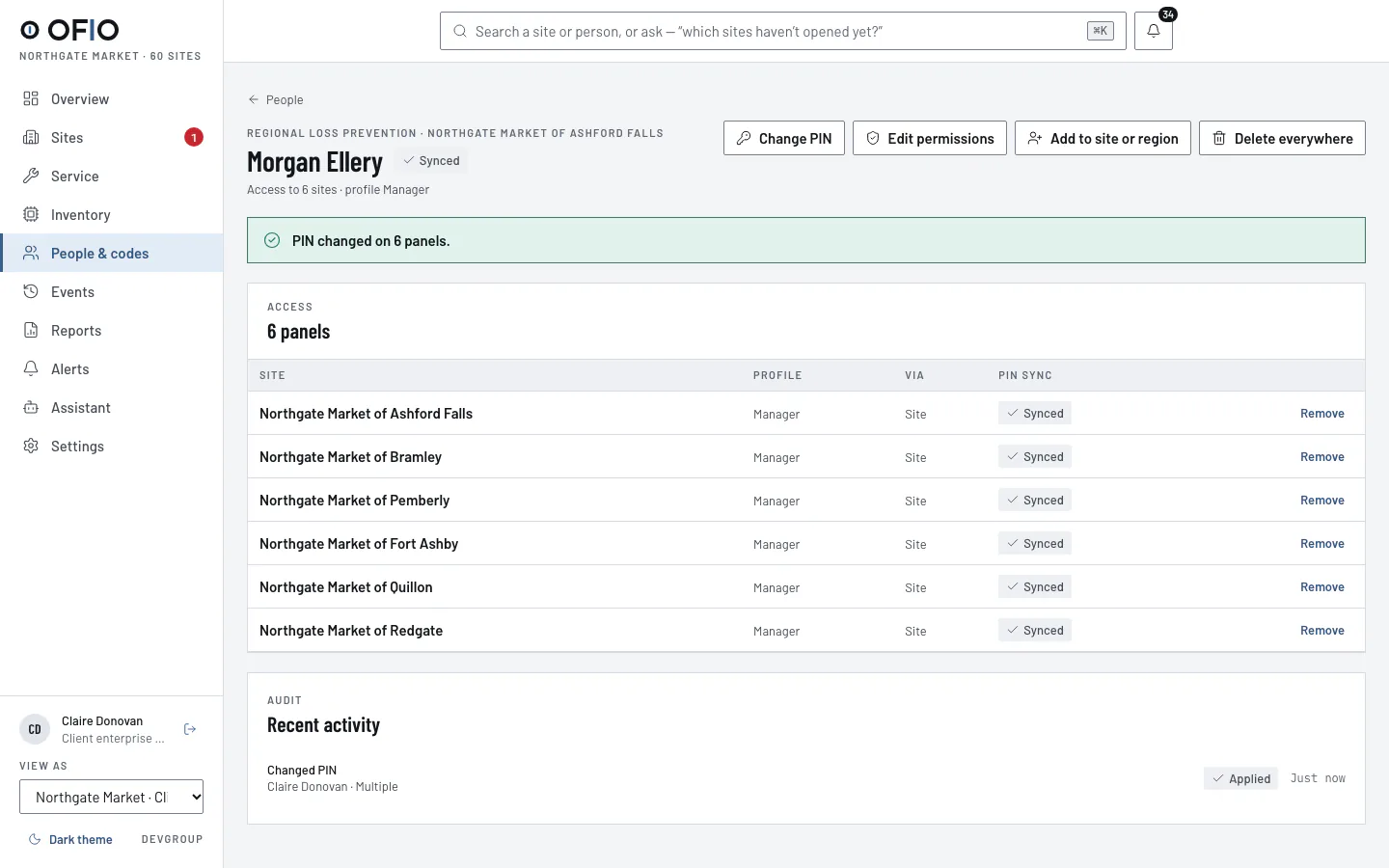
The directory is the source of truth for every panel. A change lands panel by panel, and a panel that rejects it says why.

  • PIN sync state for each panel, never the code itself
  • Edit what a person’s code can do
  • Shared codes found and split, temporary access that expires
Changing a person’s PIN on six panels: the code is masked, then each panel moves from Syncing to Synced in turn until PIN changed on 6 panels.

Arming

Confirm, then OFIO waits for the panel.

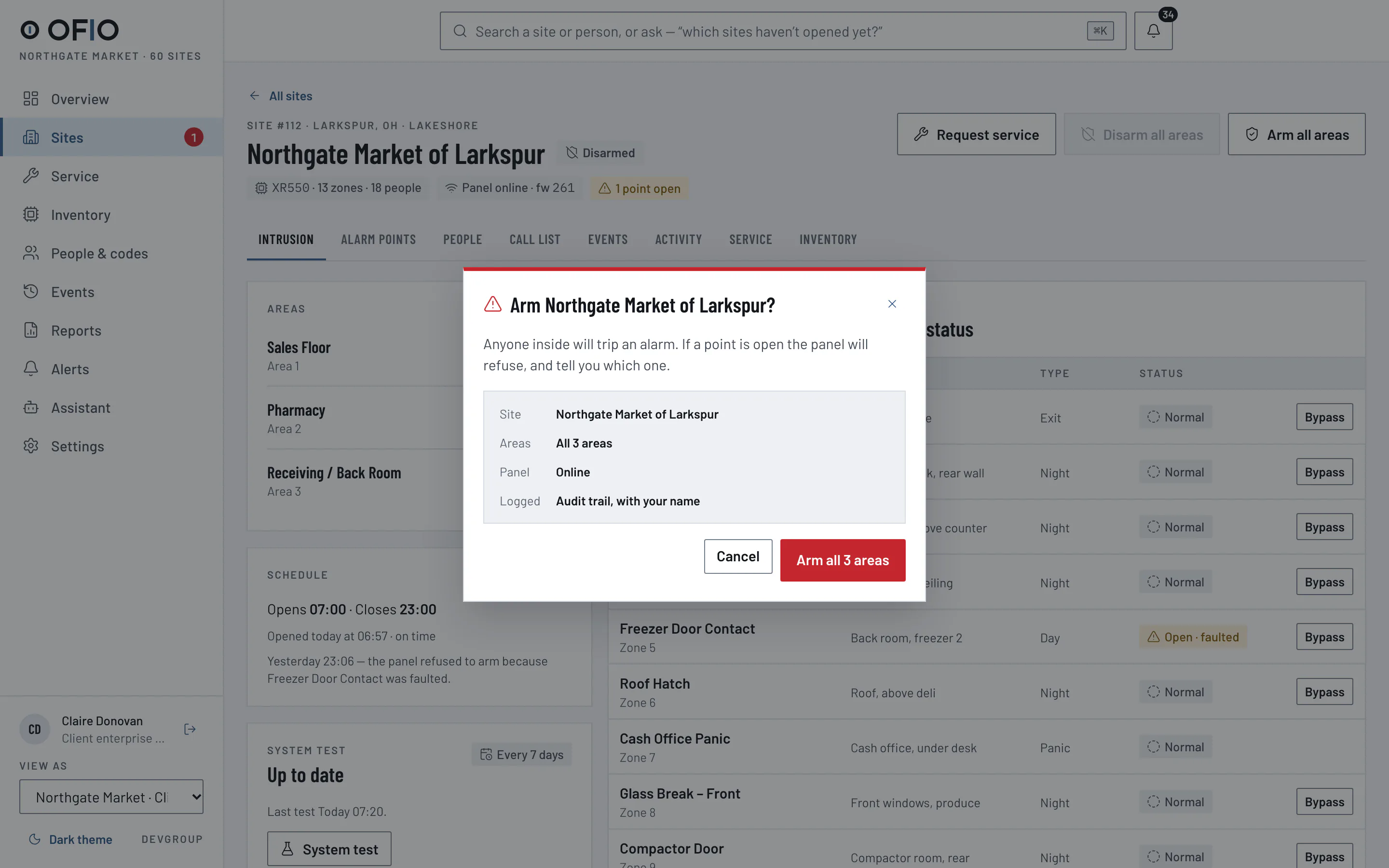
An arm names the site and its areas before it is sent, shows pending until the panel answers, and never flips to armed on its own.

  • A refused arm names the open point
  • Bypass it and arm everything else; life-safety points cannot be bypassed
  • Auto-arm after close, by group or site
The arm confirmation dialog: it names the store, all three areas, the panel’s state and that the action is logged, before anything is sent.

One vocabulary

Every vendor, the same words.

Each connector maps its vendor’s terms into OFIO’s. The vendor’s own word appears only in the detail view, beside a neutral vendor tag.

Sites
A store, branch or building, in a region and in groups.
Areas
What arms and disarms: the whole store, or the pharmacy alone.
Points
Zones and sensors: doors, motion, freezer contacts, panic.
People
One record per person, across every panel they need.
Codes
PINs and user numbers, synced and confirmed per panel.
Events
Alarms, openings, closings and bypasses, with site, point and time.

Follow up

Alerts, events, reports, service and the assistant.

Alerts

The right person hears about it first.

Rules send alarms, offline panels, failed arms and late opens to the people who own them, by email or text, with escalation.

  • Rules per group or site
  • Notification preferences per person
  • Every alert links to the screen that answers it
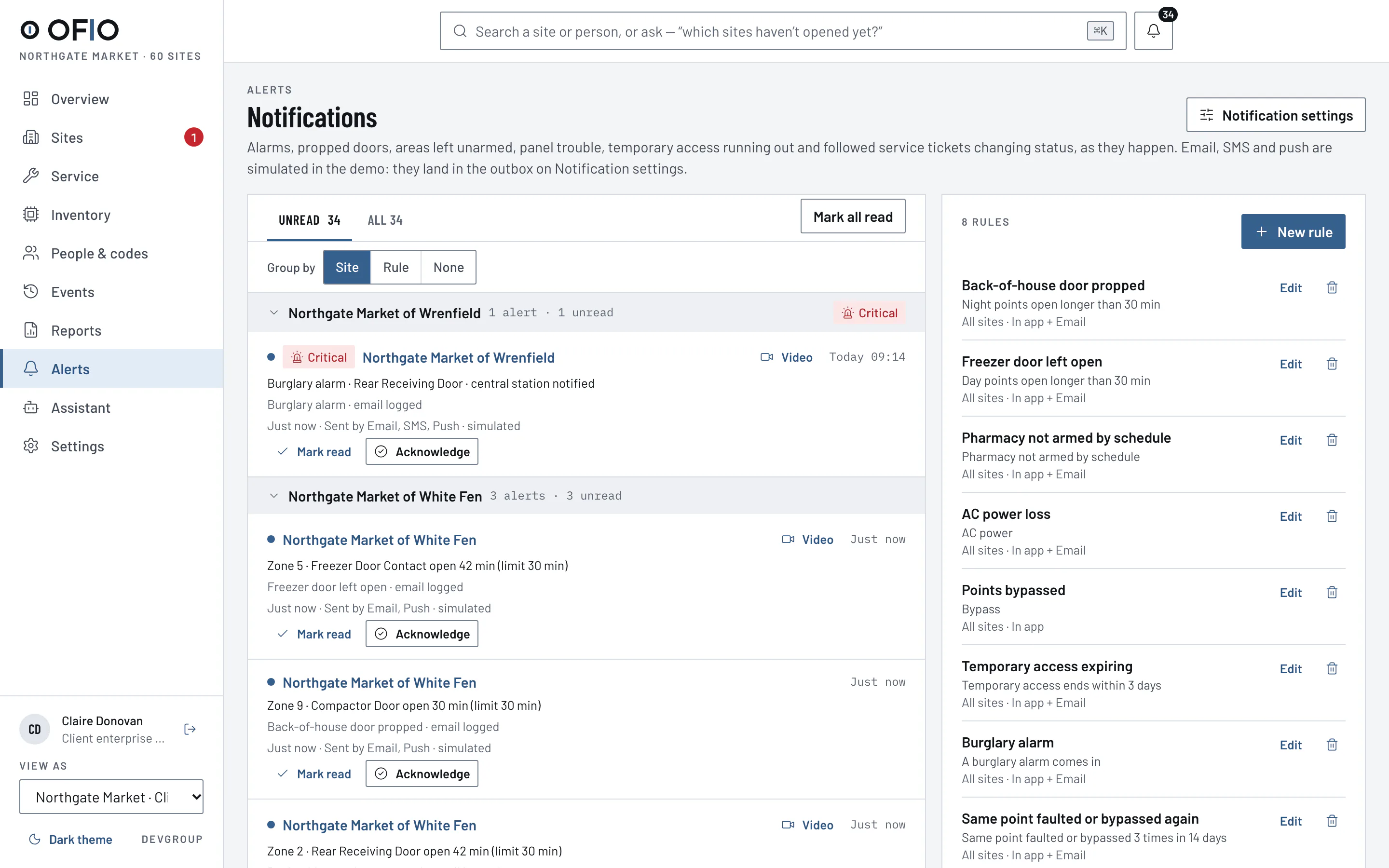
Alerts: notifications grouped by store, with severity, a Video link and where each was sent, beside the eight rules that send them.

Events & video

From the event to the recorded video.

Openings, closings, alarms and bypasses from every panel in one activity log, and an audit trail of what people did. An alarm row opens recorded video at that moment.

  • Activity from every panel’s sensor log
  • Audit of every command, confirmation and acknowledgement
  • Cameras mapped to zones, one click to the clip
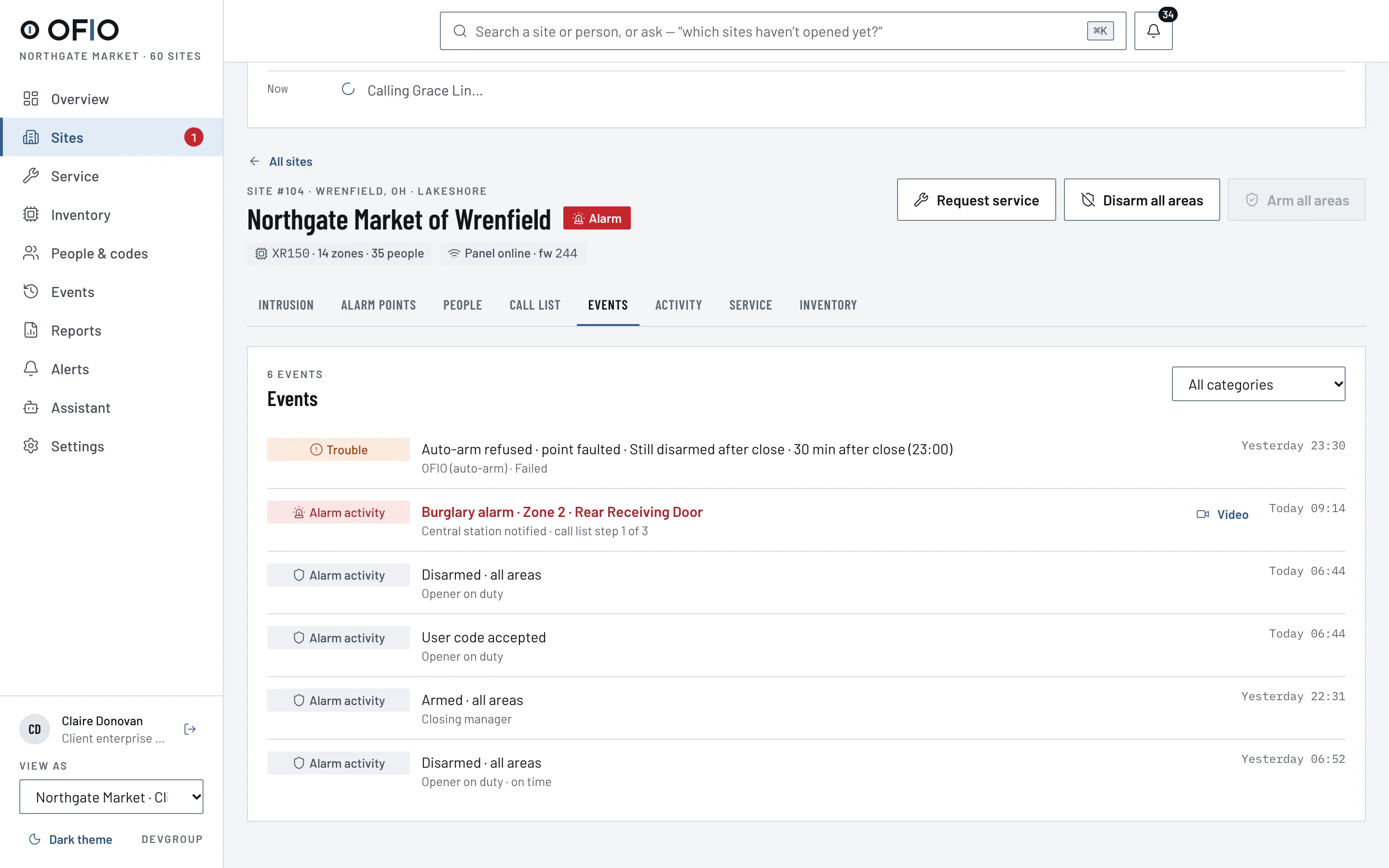
A store’s events: an auto-arm refusal and the burglary alarm, whose row carries a Video link that opens OpenEye at that camera and moment.

Reports

Exceptions only, on a schedule.

Fail-to-arm, late to test, late opens, openings and closings, alarms, offline and faulted, communication failures, people activity, the dealer scorecard, weekly risk and an executive summary.

  • Email on a schedule, exceptions only by default
  • “No exceptions last night” when every site armed on time
  • CSV export
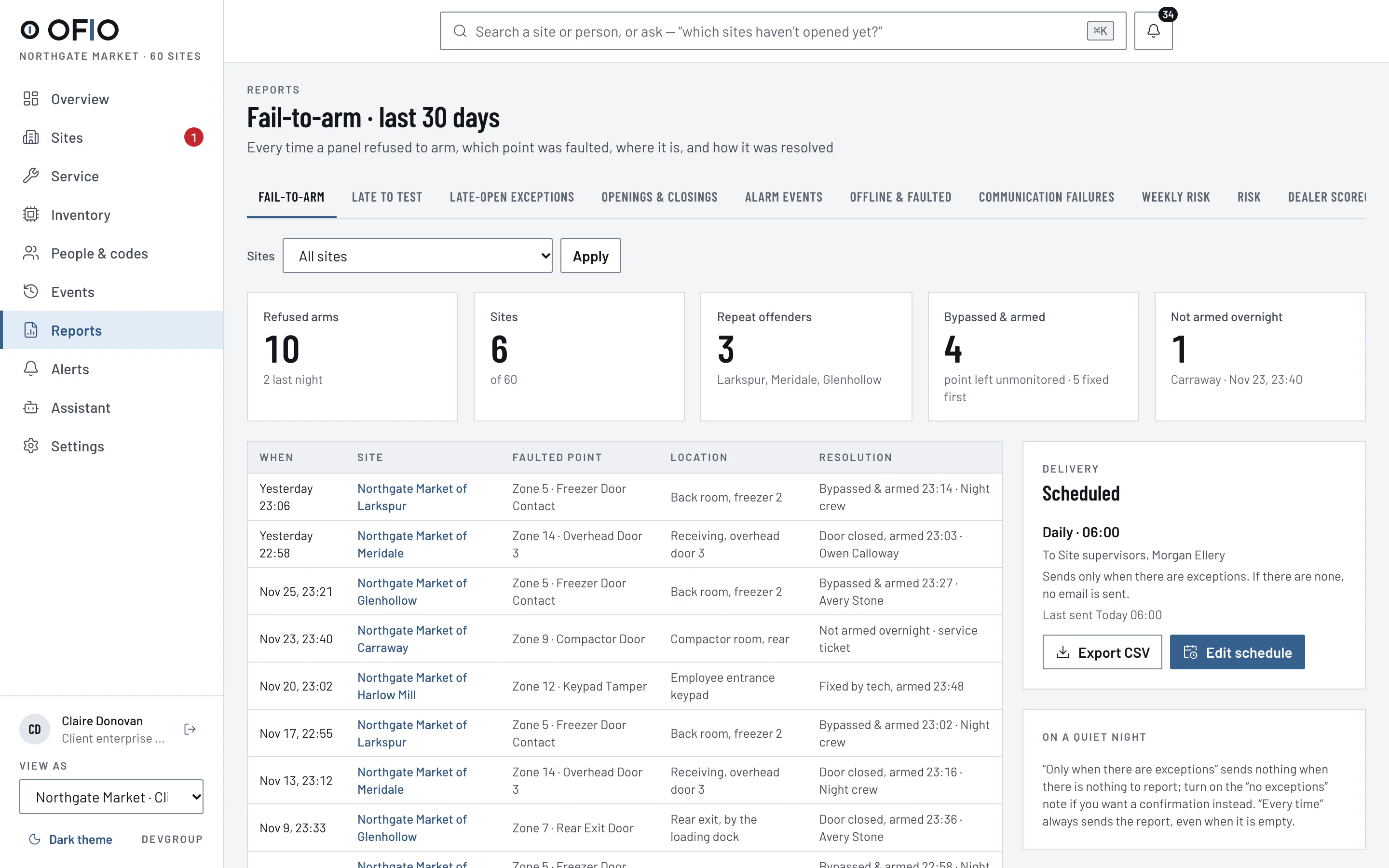
The fail-to-arm report: refused arms, repeat offenders and bypasses over 30 days, each row with the faulted point and how it was resolved, beside the daily delivery schedule.

Service & risk

One ticket, one timeline.

Request service from the site. The dealer updates the ticket by secure link or by replying to the email, and every step lands on one timeline with its SLA clock.

  • Risk scores for every site and device
  • Repeat problems found on their own and offered as tickets
  • Inventory, firmware compliance and device ticket history
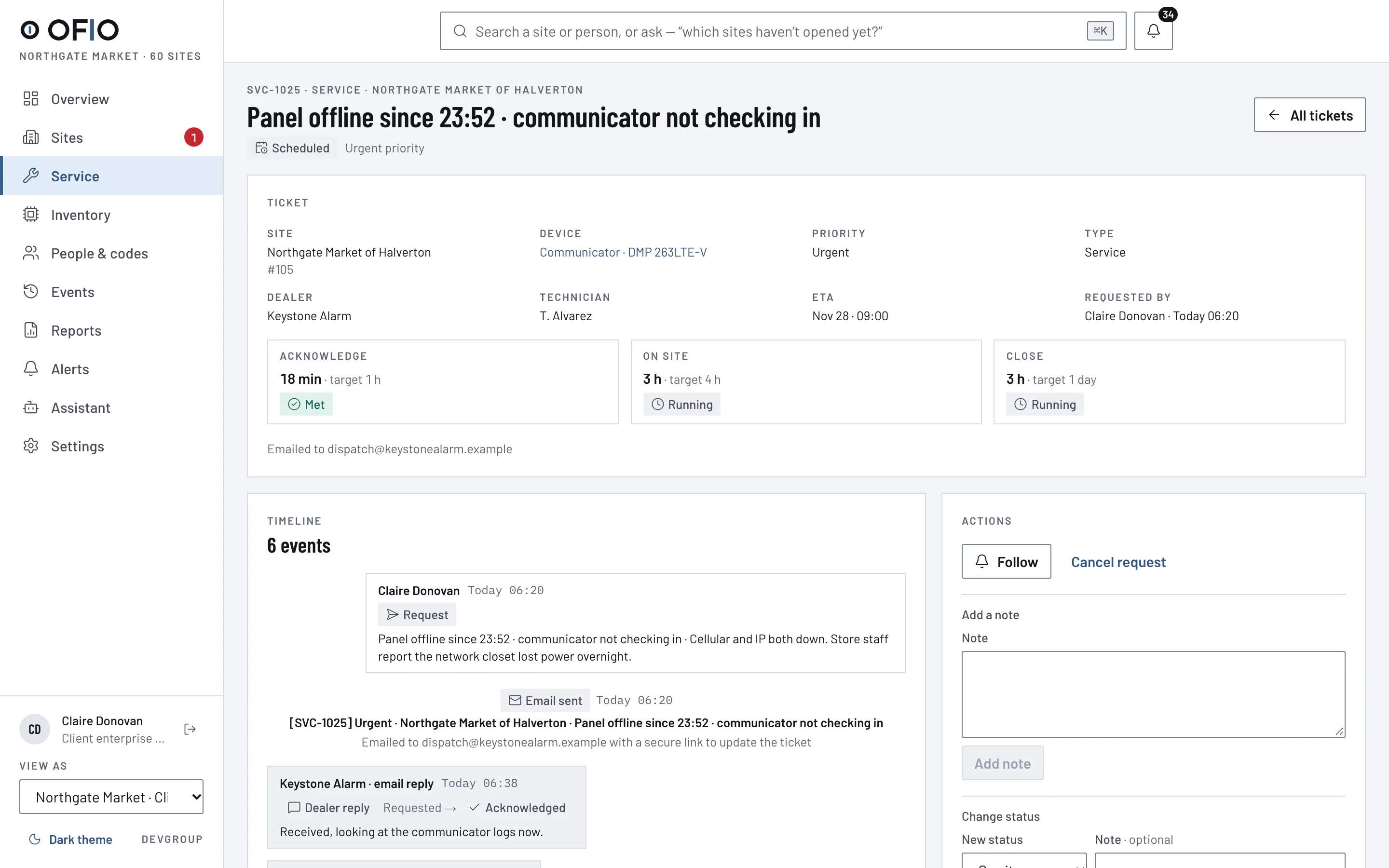
A service ticket for an offline panel: dealer, technician and ETA, SLA clocks for acknowledge, on site and close, and a timeline with the dealer’s email reply.

Assistant

Plain-language requests become a plan you confirm.

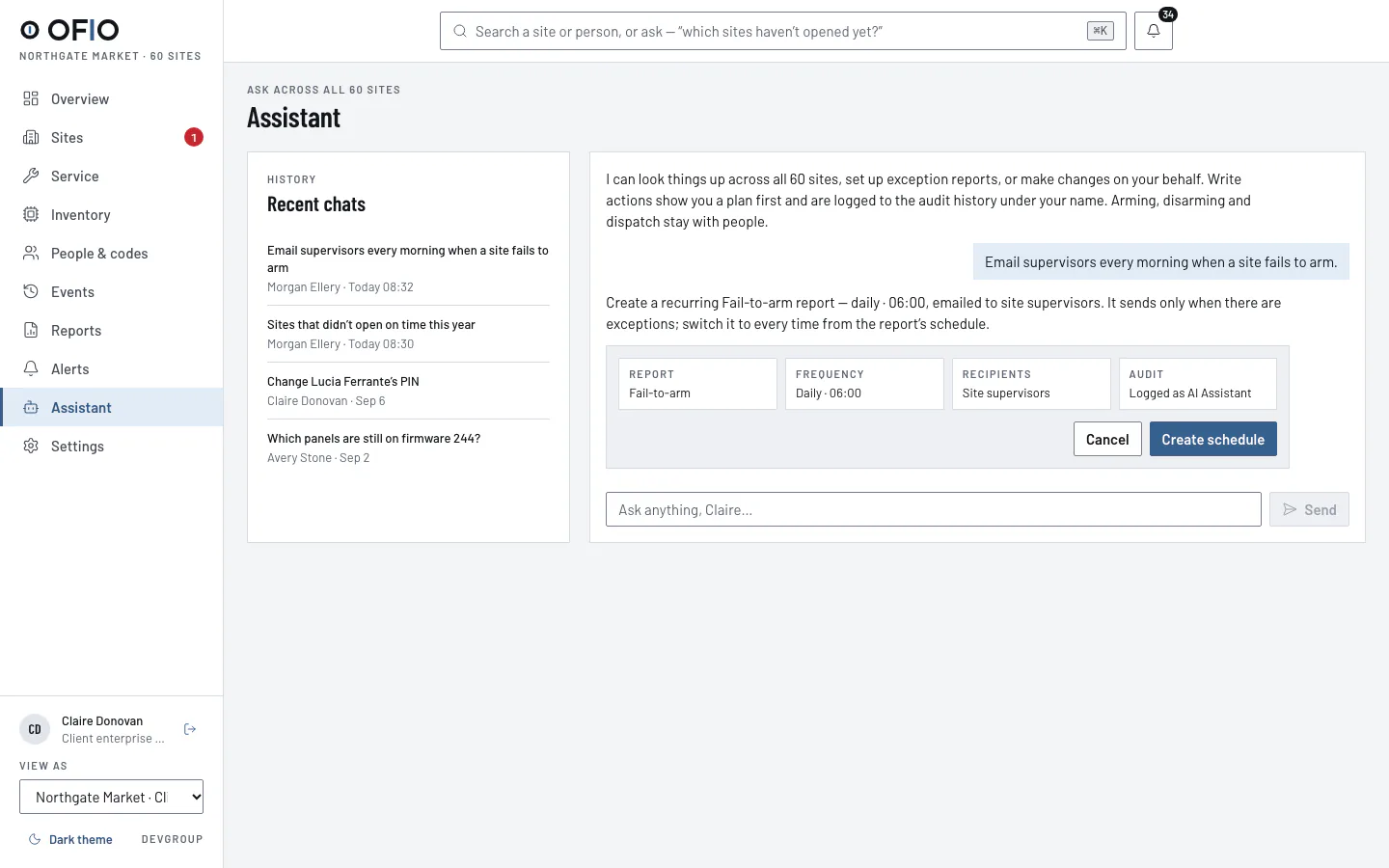
Ask for a report, a lookup or a change across every site. OFIO shows the plan first; a person confirms it, and it is written to the audit log.

  • It never arms or disarms, by design
  • Totals come from the console’s own counts
  • Open it from anywhere with ⌘K
A plain-language request becomes a plan; a person opens the confirm dialog, confirms, and the schedule is created and logged.

Servicing these sites as a dealer?

The dealer portal gives you customer accounts, service requests, dispatch, inventory and pricing.

OFIO for dealers

Get started

See your own fleet in OFIO.

Book a walk-through on the problems your sites have today, or ask for a sandbox and work the Northgate Market fleet yourself.

Book a demoTry the sandbox
Take the 2-minute tour
OFIO

Access control command center

Product

  • Product
  • Product tour
  • Integrations
  • Why OFIO

Solutions

  • Enterprise
  • Dealers

Get started

  • Book a demo
  • Try the sandbox

Company

  • Company
  • Privacy
  • Terms

Created by DevGroup · EDGE Affiliates