OFIO
  • Product
    • Enterprise
    • Dealers
  • Integrations
  • Why OFIO
  • Sign in
Book a demo

For security dealers and integrators

Fewer truck rolls. Customers who can see the work.

A dealer portal for your customer accounts, service requests, dispatch, inventory and pricing, on the same data your customers see.

Book a demoTry the sandbox
Take the 2-minute tour
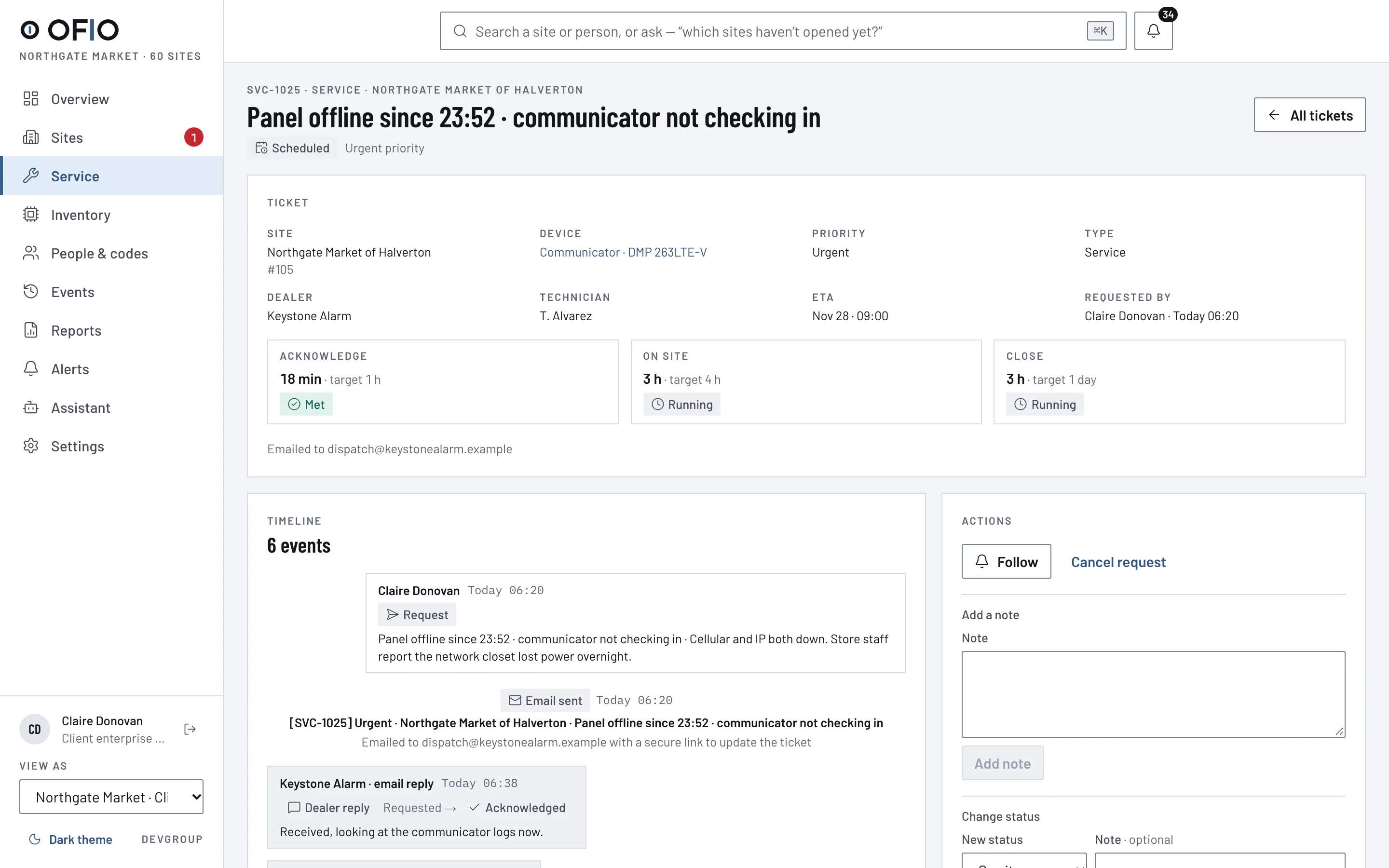
A service ticket for an offline panel: dealer, technician and ETA, SLA clocks for acknowledge, on site and close, and a timeline with the dealer’s email reply.

What changes

From callbacks to one timeline.

Today

With OFIO

  • TodayA tech drives out to find a door left open, not a fault.

    With OFIORisk scores and repeat problems show what is really failing before anyone rolls.

  • TodayCustomers call to ask where the tech is.

    With OFIOThe ticket keeps one timeline the customer can see, with the technician and ETA.

  • TodayUpdating a ticket means logging in to someone else’s system.

    With OFIOUpdate by secure link or by replying to the email. No login needed.

  • TodayNobody is sure which panels are behind on firmware.

    With OFIOInventory shows every device, its firmware against the latest release, and its ticket history.

The dealer portal

Your customers, your queue, your parts.

Customers

Every account and its health.

Each customer with its sites, active alarms and offline panels. Open an account to see its sites as the customer does.

  • Add a customer account
  • Alarms and offline panels across customers
  • Each account’s sites and their state
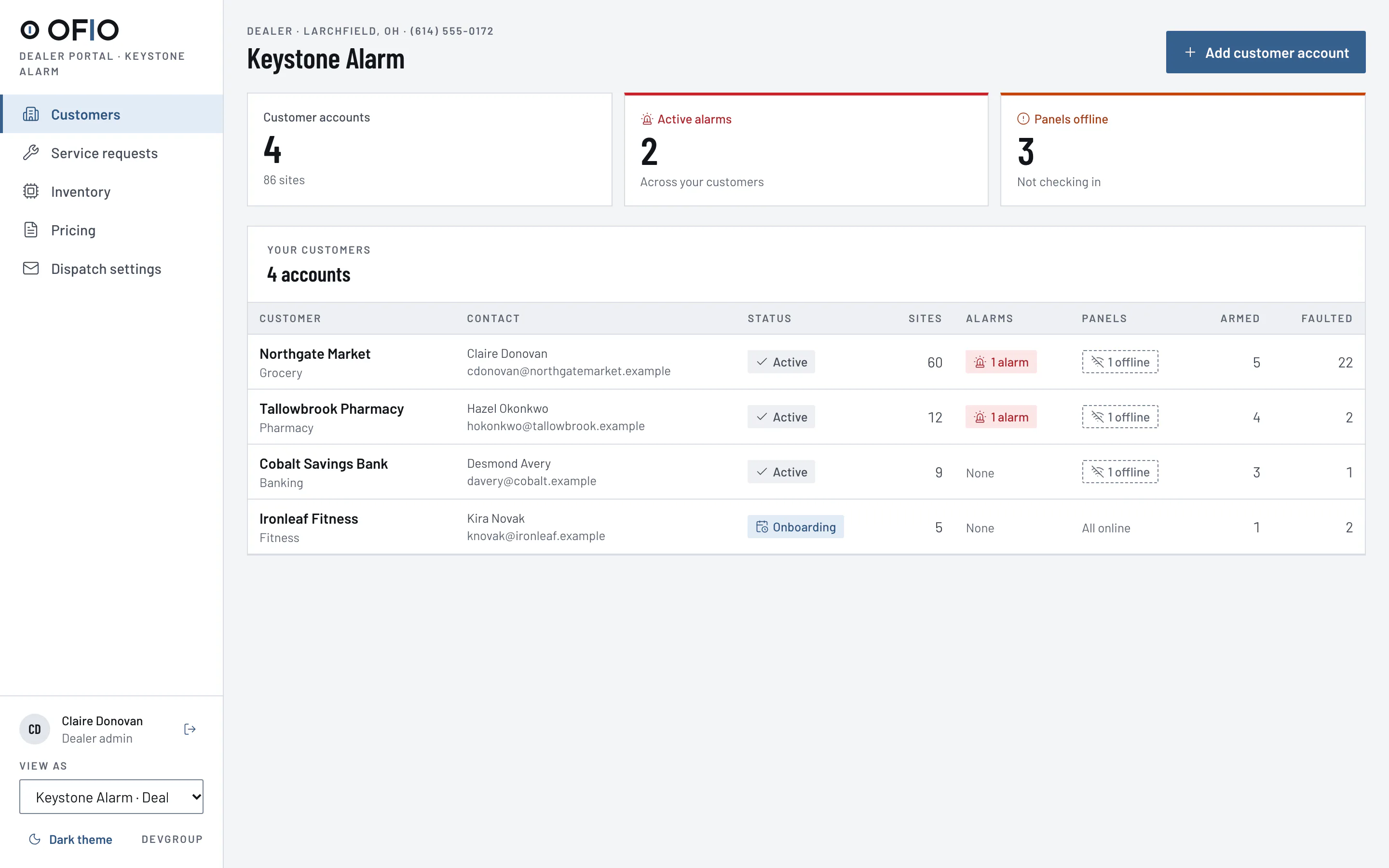
The dealer portal for Keystone Alarm: four customer accounts with contact, status, site count, active alarms, offline panels, armed and faulted counts.

Service requests

One queue, one timeline per ticket.

Requests arrive from customers’ sites with the site, device and history attached. Assign a technician and an ETA; the customer sees it.

  • Priority and SLA clocks
  • Dispatch settings: where requests go
  • Status from an email reply
The dealer’s service requests: tickets from every customer with site, status, overdue flags, priority, technician and age.

Risk

Know which device will fail next.

Every site and device is scored on its recent trouble. The same point failing again and again becomes a suggested ticket.

  • Top problem sites and devices
  • Breakdown by district
  • 8-week trend
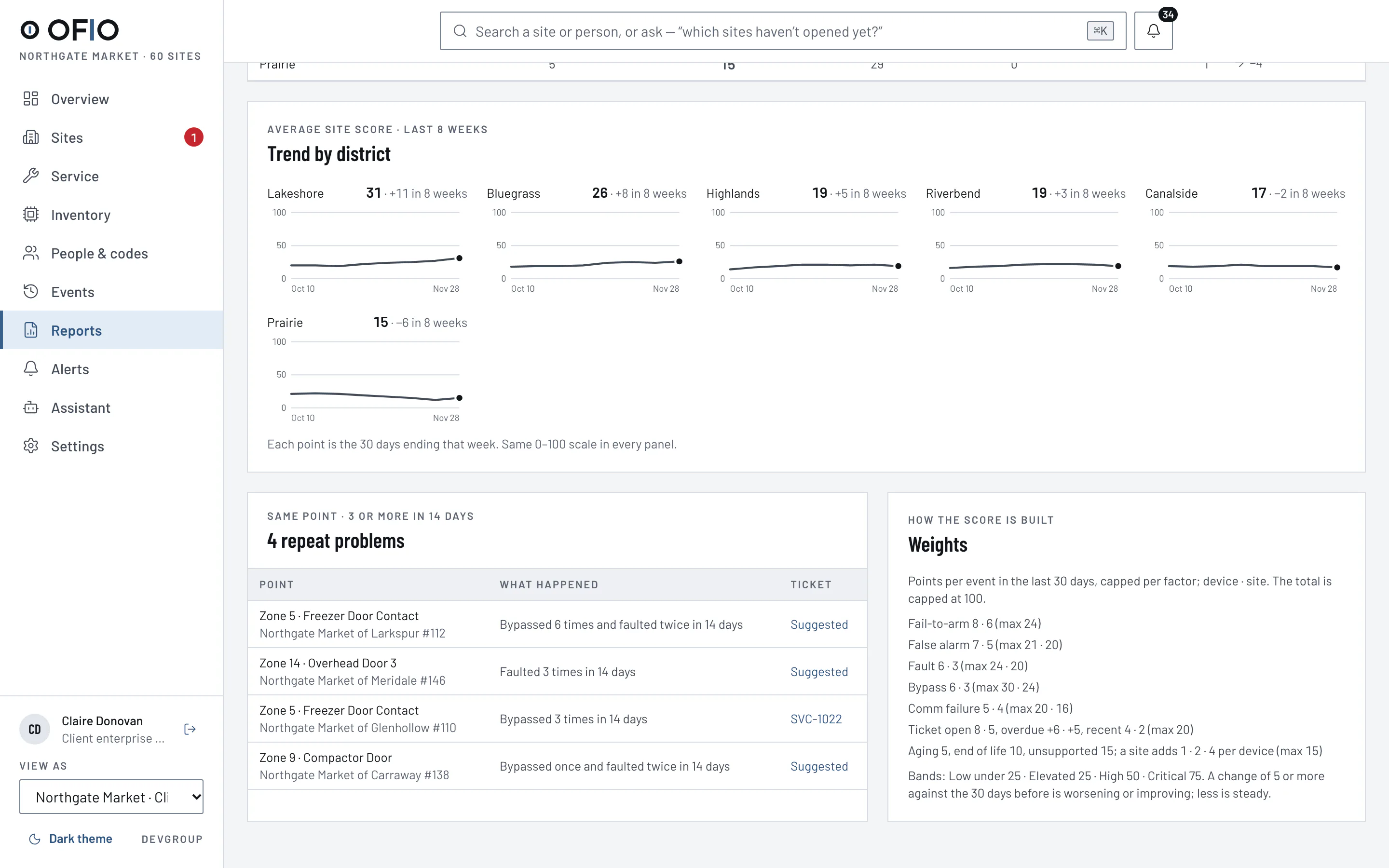
The foot of the risk report: average site score by district over 8 weeks, four repeat problems found on one point in 14 days with a suggested ticket, and how the 0–100 score is built.

Inventory & pricing

The parts list and the price list.

Own your customers’ inventory records and price replacements from your own list.

  • Firmware compliance by model
  • Device ticket history
  • A price list per model
Fleet inventory: device counts past end of life, due for replacement, batteries due and behind on firmware, and the device list filtered to high risk.

Questions

What buyers ask first.

Do customers see the dealer portal?

No. Customers see their own sites and tickets; the portal shows only your accounts, requests, inventory and prices.

Do technicians need an account?

No. A ticket can be updated from its secure link or by replying to its email, and the update lands on the timeline.

Which panels does it work with?

DMP intrusion panels, plus a jump from sensor events to OpenEye video. The Integrations page lists every connector.

Does OFIO dispatch for me?

No. Dispatch stays with your team. OFIO routes each request to the address in your dispatch settings.

Get started

See your own fleet in OFIO.

Book a walk-through on the problems your sites have today, or ask for a sandbox and work the Northgate Market fleet yourself.

Book a demoTry the sandbox
Take the 2-minute tour
OFIO

Access control command center

Product

  • Product
  • Product tour
  • Integrations
  • Why OFIO

Solutions

  • Enterprise
  • Dealers

Get started

  • Book a demo
  • Try the sandbox

Company

  • Company
  • Privacy
  • Terms

Created by DevGroup · EDGE Affiliates